You probably haven't set up your credentials correctly and CELUS is not harvesting all the reports you need. You can see which reports are being harvested for individual platforms on the SUSHI Management page under "Active Reports":

In the screenshot above, you can see that only TR and PR report types are currently being harvested for Our ACS. To change which report types will be harvested, click on "EDIT" and in the following dialog, remove or add the report types as you wish. Usually, CELUS will help you with this by showing a little blue or/and green icon next to the report - the blue R means that according to the COUNTER Registry, this vendor provides the report type. The green icon means that other users harvested this report successfully. In this case, we can see that all reports confirmed by COUNTER Registry or CELUS users are already active:
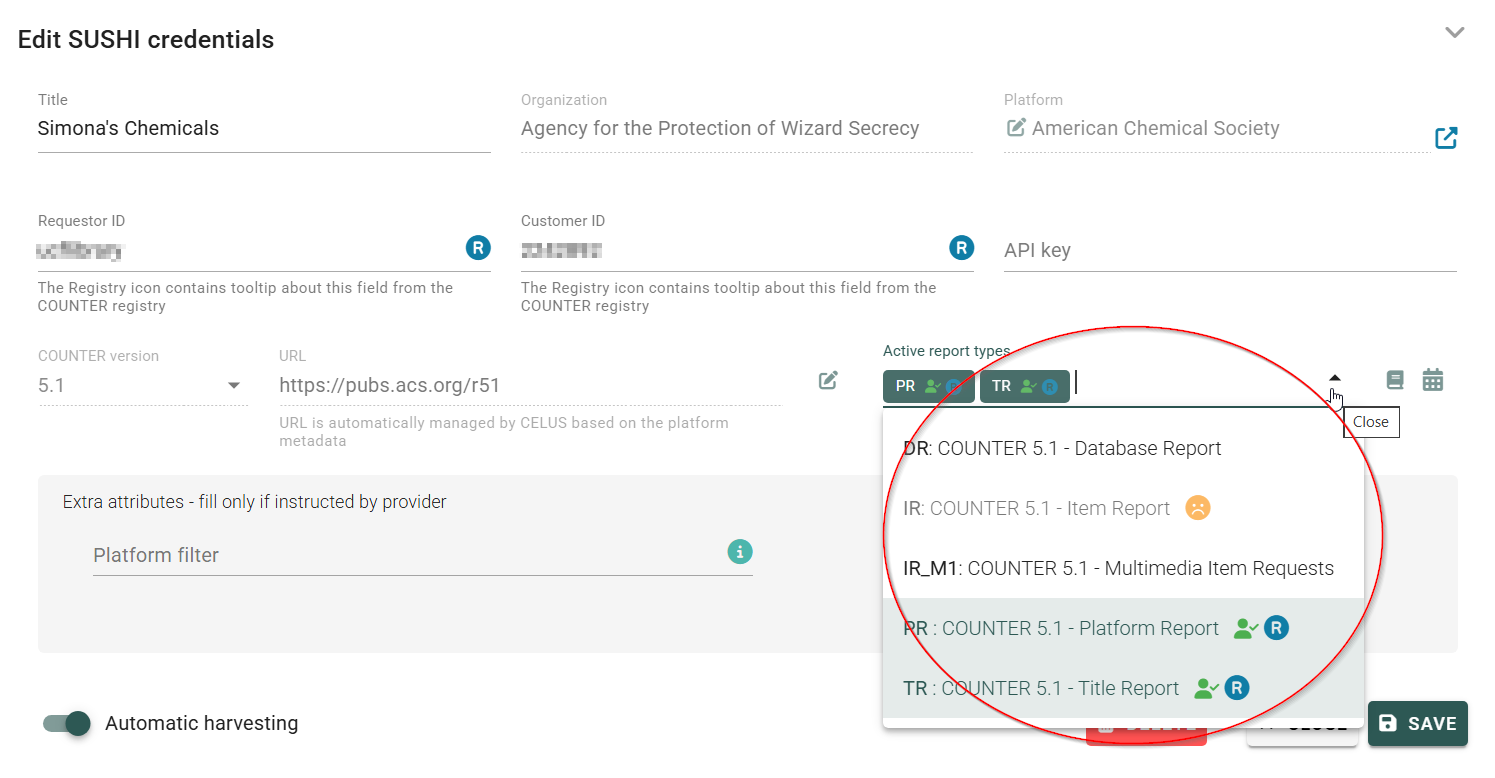
In some cases, the Active Reports icons may appear greyed out. When you hover over them, the help text explains that the List of Reports is managed by platform.
This means that the information about which reports are active for that platform has been taken from the COUNTER Registry and applied automatically. This is the safest option, as it helps ensure that you are harvesting the correct reports.
However, you can still make changes if needed—for example, you can stop harvesting a report type you do not want to use—by clicking Edit:

and clicking the pencil Edit icon next to the Active report types:

Here you can set up the Active reports manually.
Now you can happily harvest the reports for the months you need it for your analysis. Not sure how? Please refer to this article.